
How to Build an MVP with AI: A Practical 6-Step Guide

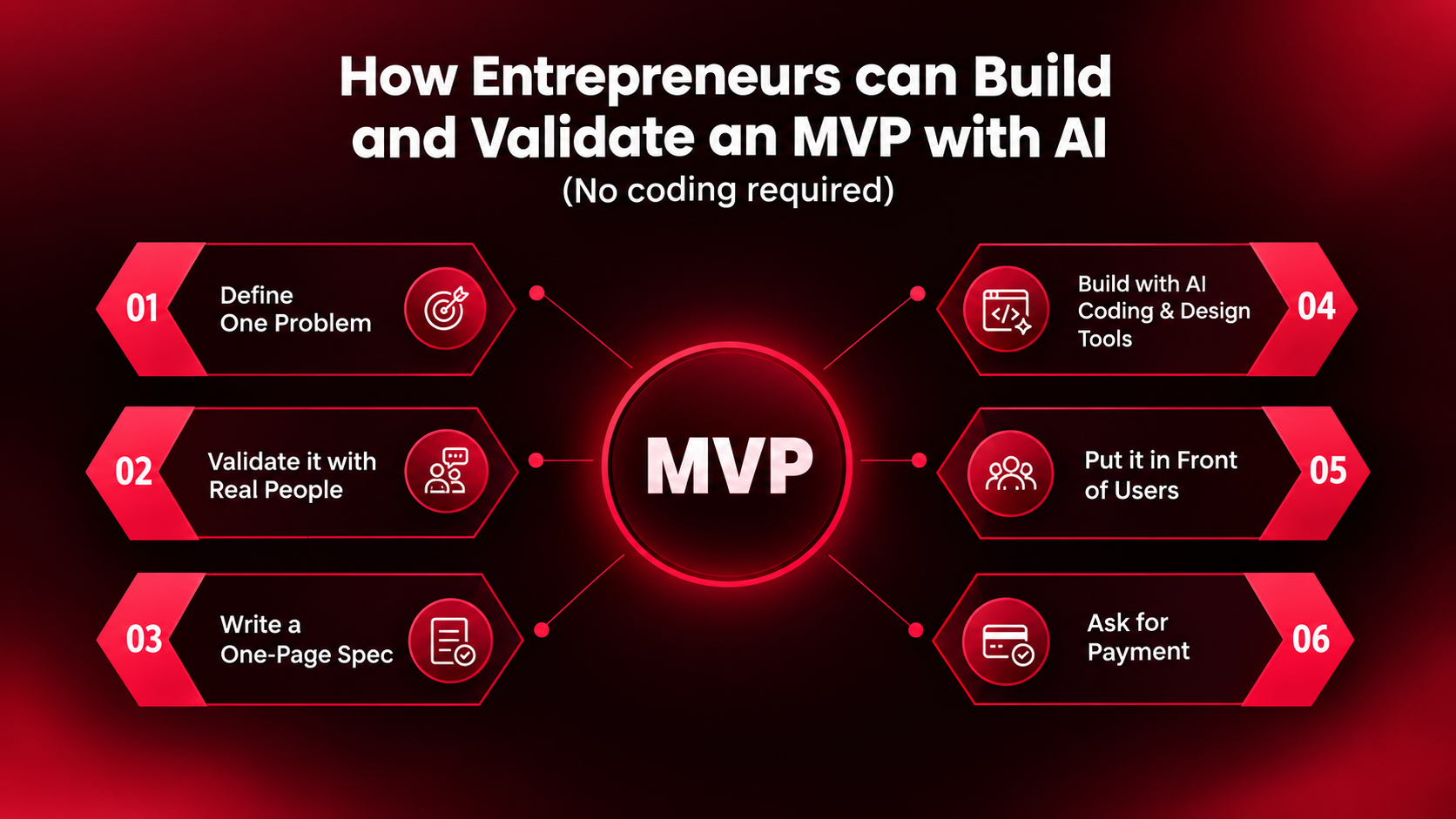
You can build an MVP with AI in six steps: define one problem, validate it with real people, write a one-page spec, build with AI coding and design tools, put it in front of users, and ask for a meaningful commitment.
You don't need to write every line of code yourself. You do need to understand what the AI is building, because there is a big difference between generating a prototype and shipping a product that real people can trust.
A few years ago, building a software product often meant hiring a developer or spending months learning to code. Today, AI coding and app-building tools can turn plain-language instructions into working software. Taskade, for example, reports that 63% of its Genesis users are non-developers, highlighting how AI-assisted building is moving beyond traditional software teams.
But easier building creates a different problem.
The biggest risk is no longer only whether you can build something. It is whether you are building something people actually need.
CB Insights' analysis of 431 VC-backed companies that shut down since 2023 found that poor product-market fit was cited in 43% of post-mortems. The analysis also notes that companies can cite multiple reasons for failure, so the numbers should be treated as overlapping signals rather than mutually exclusive causes.
That is why the right approach is not simply to prompt an AI until an app appears.
It is to validate first, build deliberately, test with real users and improve based on what you learn.
What is an MVP, and why does AI change it?
An MVP, or minimum viable product, is the simplest version of a product or experience that lets you test an important assumption with real users.
The purpose of an MVP is not to impress people with features. It is to learn whether your solution solves a real problem.
Sometimes that means a working web application. Sometimes it can be a simple prototype or even a partially manual service. The right MVP depends on what you need to learn.
AI changes how quickly you can create these experiments. For a narrowly scoped software product, a solo founder can sometimes move from an idea to a working prototype in weeks rather than months.
That speed is useful only when it is paired with good product thinking.
When building becomes easier, the temptation is to skip research and start prompting immediately. Resist that temptation.
Step 1: Start with one specific problem
Before you open an AI tool, write one sentence:
Who has what problem, and how do they solve it today?
"A tool for small businesses" is too vague.
"A way for Bengaluru gym owners to follow up on unpaid memberships without making awkward phone calls" is specific enough to investigate.
The second statement tells you who the user is, what the pain point is and what existing behaviour you are trying to improve.
If you cannot describe the problem clearly, you probably don't have a product idea yet. You have a theme.
A useful problem statement looks like this:
For [specific user], [specific problem] makes [specific task] difficult, so they currently [existing workaround].
The clearer this is, the easier it becomes to decide what your MVP should and should not contain.
Step 2: Validate your startup idea with AI before committing to a full build
Do not spend weeks building before finding out whether the problem is real.
Start by looking for evidence that people already experience the problem. Useful sources include Reddit discussions, one-star reviews on app stores, G2 reviews, support forums and job posts that describe repetitive manual work.
These sources can reveal useful signals because people often describe what frustrates them, what they have already tried and what they are forced to do manually.
But treat those conversations as signals, not proof. Online complaints can have selection bias, and the loudest problem is not necessarily the most valuable one.
The next step is to talk to real people.
Start with around 10 to 20 people who actually experience the problem. Ask about their most recent experience with it:
- What happened?
- How do you solve it today?
- How often does this happen?
- What does it cost you in time or money?
- What have you already tried?
Do not begin by pitching your product.
You are trying to understand the problem before asking people to believe in your solution.
AI can make this research faster. You can use it to summarise complaint threads, cluster recurring problems, draft interview questions, compare notes and identify patterns across conversations.
But AI cannot conduct the validation for you.
The important evidence still comes from people who actually have the problem.
Step 3: Write a one-page spec before you prompt
This is one of the easiest steps to skip and one of the most valuable.
Before asking an AI tool to build your application, write a one-page product specification.
Include:
The user: Who is this product for?
The one job: What is the single most important thing the user should be able to do?
The core experience: What are the three most important screens, actions or workflows?
What's out of scope: Which features are deliberately not being built?
Success test: What result would tell you the MVP is working?
For example, your spec could say:
A gym owner can see overdue memberships, select a member and send a personalised reminder in under 30 seconds.
That is much better than:
Build an AI gym management platform.
The first tells the AI what matters.
The second leaves hundreds of decisions open.
A good specification also protects you from scope creep. Every feature you add creates something else to test, debug, secure and maintain.
Your first MVP should therefore have fewer features than you think it needs.
Step 4: Build an MVP with AI without writing all the code yourself
Now you can start building.
A practical workflow looks like this.
1. Prototype the experience
Turn your one-page spec into screens or an interactive prototype using AI design tools such as Google Stitch or Claude Design.
The goal is not to create a perfect visual design.
It is to make the workflow visible enough that you can spot confusing steps before spending time implementing them.
For some products, you may not need a polished interface at all. A simple prototype or manual workflow can be enough to test the idea.
2. Generate the application
Once the flow makes sense, use an AI coding tool such as Cursor, Claude Code or Codex to turn your specification into a working application.
The important part is how you prompt.
Do not dump the entire product into one enormous request.
Build one workflow at a time.
For example:
Build the login screen first.
Then:
Add the dashboard showing overdue memberships.
Then:
Add the reminder workflow.
Then:
Connect the dashboard to persistent data.
This makes it easier to understand what changed and catch problems before they spread through the application.
3. Add data persistence when your product needs it
Not every MVP needs a database.
A calculator, generator or simple one-time tool may not need persistent data at all.
But if users need accounts, saved work, history, shared information or personalised experiences, you need reliable data storage.
Connect a proper database and understand how your application handles authentication, permissions and user data.
A database by itself does not make an application secure. You also need to make sure one user cannot access another user's information.
4. Automate repetitive workflows
Once the core product works, automate the repetitive parts.
Tools such as n8n can connect applications and APIs and automate workflows with little or no code. You can use automation for tasks such as sending emails, triggering notifications, moving data between tools or starting a workflow after a user action.
But automation should support the product rather than become the product.
Build the core user experience first. Automate the repetitive work around it second.
5. Deploy it to a real URL
A local prototype can teach you about your product's interface and logic, but it limits what you can learn from real-world usage.
Deploy your MVP so people can actually use it.
Once it is live, you can observe what breaks, what confuses users and whether people come back.
That feedback is more valuable than another week of polishing a prototype nobody has used.
Why does vibe coding fail?
Vibe coding is generally used to describe building software through natural-language instructions and relying heavily on AI-generated code. The problem starts when the builder accepts the output without understanding or properly reviewing what has been produced.
That approach is useful for quickly exploring an idea.
It becomes risky when you are dealing with real users, persistent data, payments or sensitive information.
The failure modes are predictable.
No plan
The AI makes decisions about architecture, features and behaviour that you never deliberately chose.
No version control
You make one change, something that worked earlier breaks, and you have no reliable way to restore the previous version.
Using Git gives you a history of your changes and makes experimentation much safer.
No understanding of the code
You do not need to become a software engineer.
You do need to understand the major parts of what you have built.
You should be able to explain where user data is stored, how users authenticate, what APIs are being called, where secrets are kept and what happens when something fails.
No testing
AI can produce code that looks correct and still contains bugs.
Test the core user journey yourself.
Then test the uncomfortable cases:
What happens with incorrect input?
What happens when a user is not authorised?
What happens when an API fails?
What happens when the database is unavailable?
What happens when two users perform the same action at the same time?
No security review
This becomes especially important when your product handles personal information, credentials or payments.
At minimum, review authentication, authorisation, database access rules, exposed API keys and secrets, user-data separation, input validation and third-party integrations.
The goal is not to understand every line of code.
The goal is to understand enough of the system to know what you are shipping.
Step 5: Put your MVP in front of real users
Once the MVP works, stop building for a moment.
Give it to a small group of people who actually have the problem you identified in Step 2.
Then watch what happens.
Where do they hesitate?
What do they misunderstand?
Which features do they ignore?
What do they try to do that your product does not support?
What do they ask you to change?
Do not interpret every request as a feature to add.
Your job is to identify patterns.
If five users independently struggle with the same step, that is strong evidence that something needs to change.
Keep the iteration cycle small:
Build → observe → learn → change → test again.
Every iteration should answer a question.
Step 6: Ask for money or another meaningful commitment early
Compliments are encouraging.
A meaningful commitment is more useful.
For a consumer or SaaS product, that might be a payment or pre-order.
For an enterprise product, it could be a paid pilot, deposit or signed commitment.
The important thing is to test whether the problem is valuable enough for someone to take action.
Do not wait until your product is perfect.
Set a price, explain the value and ask.
If nobody commits, that is useful information too.
Maybe the problem is not painful enough.
Maybe the target customer is wrong.
Maybe the product does not solve the problem well enough.
Maybe the pricing is wrong.
You have learned something that would have been much more expensive to discover after a year of development.
Common mistakes when building an MVP with AI
Building too much
Your MVP does not need an account system, dashboard, AI assistant, analytics engine, referral programme and ten integrations on day one.
Every extra feature increases the surface area you need to test and maintain.
Skipping validation
AI makes building feel productive.
That can make research feel like procrastination.
The opposite is often true.
Ten useful customer conversations can save you weeks of unnecessary development.
Trusting AI output blindly
AI-generated code can be useful and still contain bugs or security problems.
Review what the AI creates, especially anything involving authentication, databases, payments or user data.
Validating with friends
Friends are useful for feedback, but they are rarely your strongest test of willingness to pay.
People who do not know you are often better at revealing whether the problem is actually important.
Waiting for perfection
An MVP should be intentionally limited.
It should not be carelessly built or insecure, but it also should not contain every feature you hope to add someday.
The point is to learn.
Frequently asked questions
Can I build an MVP without a developer?
Yes, many narrowly scoped software products can be prototyped and built with AI-assisted development tools.
But "without a developer" does not mean "without technical responsibility."
You still need to understand the architecture, test the product and pay particular attention to security when dealing with sensitive data, authentication or payments.
For complex, safety-critical or highly regulated products, professional engineering and security review can be essential.
How long does it take to build an MVP with AI?
There is no universal timeline.
A focused solo founder may be able to get a basic prototype live in a few weeks, but the actual timeline depends on the scope, integrations, data requirements, technical complexity and amount of testing required.
In many cases, validation and finding the right users take longer than generating the first version of the software.
What's the best AI tool to build an MVP?
There is no single best tool.
AI design tools can help you prototype the interface. AI coding tools can help you generate and modify the application. Databases provide persistent storage, while automation tools can handle repetitive workflows.
Choose the tools based on what your product actually needs rather than whichever tool is trending that week.
How do I validate a startup idea with AI?
Use AI to make research faster, not to replace research.
Use it to summarise complaint threads, identify recurring themes, generate interview questions and analyse notes from customer conversations.
Then validate those findings with real people.
The strongest signal is whether people take meaningful action, such as using the product repeatedly, agreeing to a pilot, pre-ordering or paying for it.
Is vibe coding enough to launch a real product?
Not by itself.
AI-generated code can help you move quickly, but a real product needs planning, version control, testing, security and deployment.
The goal is not to stop using AI.
The goal is to move from blindly prompting AI to deliberately building with it.
From your first AI build to a real product
Building an MVP is one skill.
Knowing what to build, why to build it, how to direct AI, how to test the result and how to secure what you ship is a much bigger skill.
AI has lowered the barrier to creating software.
It has not removed the need for product thinking.
That is why the most useful mindset for an AI-native builder is simple:
Validate first. Build small. Understand what AI builds. Test with real users. Ask for commitment.
For people who want to learn this process alongside other builders rather than figuring it out alone, Masai's AI Residency: Beyond Vibe Coding is built around this journey.
It is an eight-week hybrid programme that starts with five days in Sri Lanka, continues with six weeks of online sessions and weekly hands-on labs, and concludes with a three-day residential phase in Bengaluru for qualifying participants, including a 36-hour build challenge based on a real company problem. The programme starts on 6 January 2027.
The programme is designed for people who want to build with AI while understanding more of what sits underneath the tools. Participants work with software fundamentals, AI coding agents, data, AI agents, RAG, MCP, evaluation, security and deployment, with the goal of shipping a live product they can explain technically.
No coding experience is required. The expectation is not that participants become traditional software engineers. It is that they become capable of using AI to build more intelligently, understand what they are shipping and take an idea further than a demo.
Whether you learn through a programme, by building independently or by working with a technical team, the principle remains the same:
Validate first. Build small. Understand the system. Ship to real users.