
What is Kubernetes? Pods, deployments and services for beginners
What is Kubernetes? An open source platform for running containers at scale, explained with five manifests (Pod, Deployment, Service) checked against 1.37.

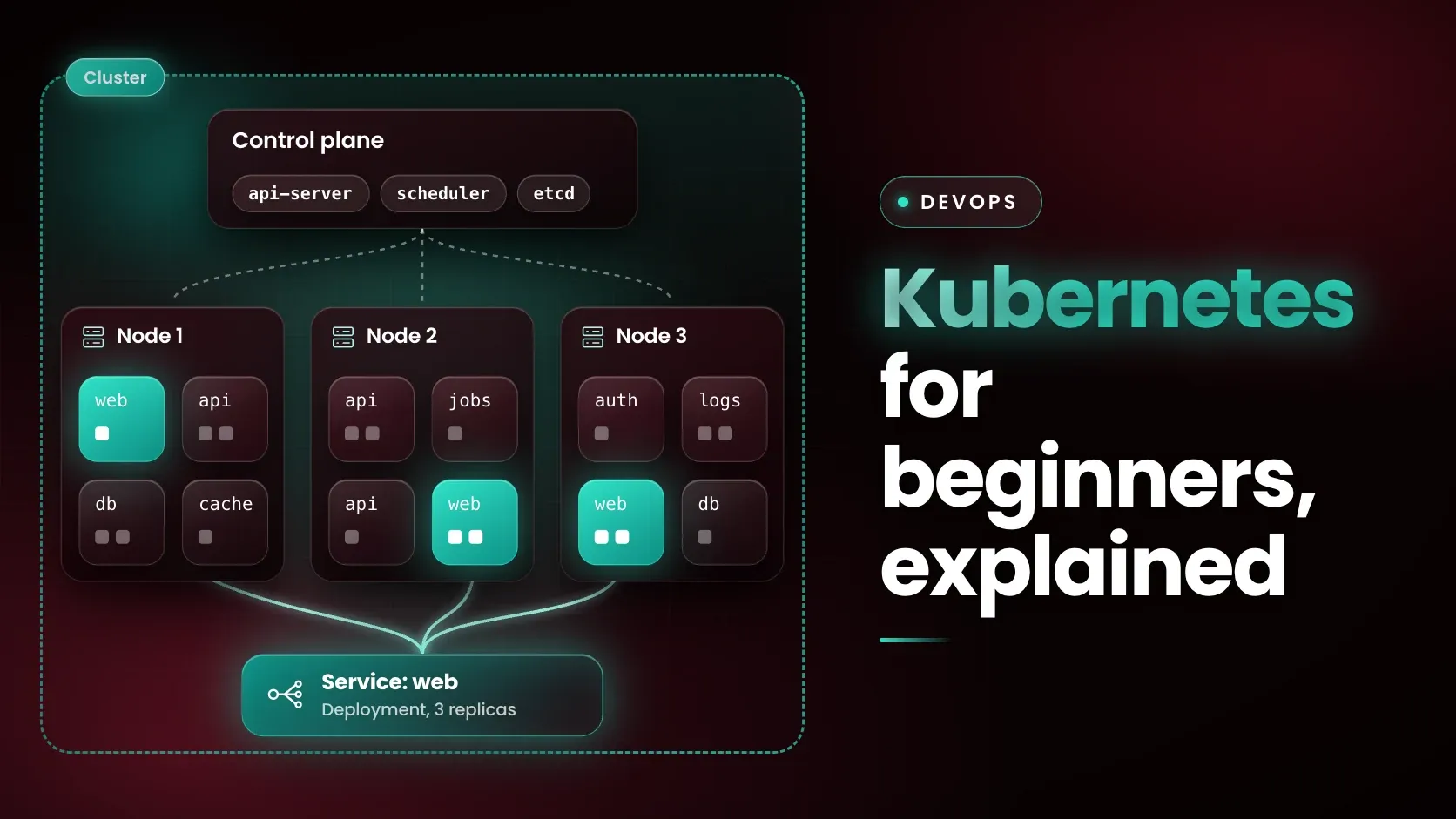
Kubernetes is an open source platform for managing containerised workloads and services through declarative configuration and automation. Google open sourced it in 2014, and the Cloud Native Computing Foundation (CNCF) now hosts it as a graduated project. A cluster restarts containers that fail, scales an application up or down and spreads traffic across copies of it. Kubernetes 1.37 is the latest minor release on 11 November 2026.
Last updated: 11 November 2026.
What problem does Kubernetes solve?
Kubernetes solves the problem of running many containers reliably across many machines. The Kubernetes documentation puts it this way: in production you need to manage the containers that run your applications and make sure there is no downtime, so if a container goes down, another one needs to start. The documentation presents Kubernetes as the system that handles this.
The documentation lists what it provides: service discovery and load balancing, storage orchestration, automated rollouts and rollbacks, automatic bin packing of containers onto nodes, self-healing, secret and configuration management, batch execution and horizontal scaling. You describe the state you want, and the control plane keeps changing the actual state until it matches.
The name comes from the Greek word for helmsman or pilot, and K8s is shorthand that counts the eight letters between the K and the s.
What are the core Kubernetes objects?
Five objects cover most of what a beginner meets first: the Pod, the Deployment, the Service, the ConfigMap and the Namespace. The table gives each object's definition from the Kubernetes documentation and the name used in the sample manifests further down.
| Object | What it is | In the sample below |
|---|---|---|
| Pod | The smallest deployable unit: one or more containers with shared storage and network resources | web-pod, one nginx container |
| Deployment | Manages a set of Pods and provides declarative updates, rollouts and rollbacks | web, three replicas |
| Service | An abstraction that exposes a group of Pods over a network | web, port 8080 to targetPort 80 |
| ConfigMap | Non-confidential configuration stored as key-value pairs, with no secrecy or encryption | web-config, one key |
| Namespace | A way to isolate groups of resources within a single cluster | demo |
The documentation adds two cautions worth remembering. Pods are generally not created directly, because they are ephemeral, disposable entities, so they are normally created through a workload resource such as a Deployment. And a ConfigMap is the wrong place for confidential data, which belongs in a Secret.
How do you write the YAML for each core object?
Each object is a YAML manifest with an apiVersion, a kind, metadata and usually a spec. The five manifests below belong to a hypothetical demo web app, and every one puts its object in a namespace called demo. They all use the image nginx:1.30, a Docker Official Image tag that exists on Docker Hub on 11 November 2026.
The Namespace comes first, because the other objects refer to it:
apiVersion: v1
kind: Namespace
metadata:
  name: demo
The ConfigMap holds one setting. Pods can read a ConfigMap as environment variables, command-line arguments or files in a volume:
apiVersion: v1
kind: ConfigMap
metadata:
  name: web-config
  namespace: demo
data:
  GREETING: "Hello from a ConfigMap"
The Pod runs one nginx container and carries the label app: web. A bare Pod like this is useful for learning, and the Deployment below is how it is normally run:
apiVersion: v1
kind: Pod
metadata:
  name: web-pod
  namespace: demo
  labels:
    app: web
spec:
  containers:
    - name: web
      image: nginx:1.30
      ports:
        - containerPort: 80
The Deployment asks for three replicas. Its selector must match the labels in its Pod template, which is how it finds the Pods it manages, and envFrom passes the ConfigMap's keys to the container as environment variables:
apiVersion: apps/v1
kind: Deployment
metadata:
  name: web
  namespace: demo
spec:
  replicas: 3
  selector:
    matchLabels:
      app: web
  template:
    metadata:
      labels:
        app: web
    spec:
      containers:
        - name: web
          image: nginx:1.30
          ports:
            - containerPort: 80
          envFrom:
            - configMapRef:
                name: web-config
The Service selects every Pod labelled app: web and forwards traffic from its own port 8080 to port 80 on those Pods:
apiVersion: v1
kind: Service
metadata:
  name: web
  namespace: demo
spec:
  selector:
    app: web
  ports:
    - port: 8080
      targetPort: 80
With no type given, this is a ClusterIP Service, the default, which the documentation says is reachable only from inside the cluster. NodePort exposes the Service on a static port of each node, and LoadBalancer uses an external load balancer that Kubernetes itself does not provide. A Service also gets a DNS name of the form service-name.namespace-name.svc.cluster.local, so a container in the same namespace can reach it by the short name web.
What was tested, and what was not?
The five manifests were validated against the Kubernetes 1.37.0 API schema with kubeconform v0.8.0, an Apache-2.0 licensed manifest validator. No cluster was started, because Docker, kind and minikube are not installed on the machine used, so the kubectl commands below come from the Kubernetes documentation and were not run here.
kubeconform -kubernetes-version 1.37.0 -strict -summary namespace.yaml configmap.yaml pod.yaml deployment.yaml service.yamlOutput:
Summary: 5 resources found in 5 files - Valid: 5, Invalid: 0, Errors: 0, Skipped: 0The same files also passed against 1.36.0. To confirm the validator catches mistakes, a copy of the Deployment with replicas set to the string "three" was rejected with "at '/spec/replicas': got string, want null or integer", and a copy of the Service with a misspelt targetPorts field was rejected with "additional properties 'targetPorts' not allowed". Passing validation means the YAML matches the schema. It does not prove that the image runs or that the Service reaches the Pods.
On a real cluster the documented sequence is to create the objects, then watch the rollout:
kubectl create -f namespace.yaml
kubectl apply -f configmap.yaml
kubectl apply -f deployment.yaml
kubectl apply -f service.yaml
kubectl get deployments --namespace=demo
kubectl rollout status deployment/web --namespace=demo
According to the documentation, kubectl get deployments prints the columns NAME, READY, UP-TO-DATE, AVAILABLE and AGE, and a finished rollout prints a line saying the deployment was successfully rolled out. Updating the image, rolling back with kubectl rollout undo and scaling are the same declarative idea applied to a Deployment.
How do the control plane and nodes fit together?
A Kubernetes cluster consists of a control plane and one or more worker nodes. The control plane decides what should run, and the nodes run it. The table lists the components named in the Kubernetes documentation.
| Part | Component | Job |
|---|---|---|
| Control plane | kube-apiserver | Exposes the Kubernetes HTTP API |
| Control plane | etcd | Key-value store for all API server data |
| Control plane | kube-scheduler | Assigns Pods not yet bound to a node to a suitable node |
| Control plane | kube-controller-manager | Runs the controllers that implement Kubernetes API behaviour |
| Node | kubelet | Ensures Pods and their containers are running |
| Node | kube-proxy (optional) | Maintains network rules on nodes to implement Services |
| Node | Container runtime | Runs the containers |
kubectl, the command-line tool, talks to the control plane through the Kubernetes API. The Deployment controller then does the work of keeping three Pods alive: if a Pod disappears, the actual state no longer matches the desired state, and a replacement is created.
What is the difference between Kubernetes and Docker?
Docker builds and runs containers, while Kubernetes manages containerised workloads across a cluster of machines. Docker's documentation describes Docker as an open platform for developing, shipping and running applications in containers, and Kubernetes' documentation describes Kubernetes as a platform for managing those containerised workloads. They work at different layers and are often used together.
The relationship changed in Kubernetes 1.24. Earlier releases included dockershim, a direct integration with Docker Engine, and it was removed in 1.24. Kubernetes now requires a runtime that implements the Container Runtime Interface (CRI), such as containerd or CRI-O. The Kubernetes dockershim FAQ confirms that images built with docker build work with all CRI implementations, so a Docker-built image still runs on a cluster. The Docker for beginners guide covers building that image.
Docker Compose sits between the two. It defines an application's containers in one compose.yaml file and starts them with docker compose up, and Docker's documentation says the easiest way to deploy a Compose application is to run it on a single server. Kubernetes becomes relevant when an application needs several nodes, rolling updates or self-healing.
Do beginners need to learn Kubernetes?
Most beginners should learn Docker first and Kubernetes when they have an application to deploy to a cluster. In the Stack Overflow Developer Survey 2026, among 10,889 respondents answering the cloud development and infrastructure question, 59.1% used Docker or Docker Compose and 26.0% used Kubernetes. That is a global survey of respondents, not Indian job postings, so it shows how tools are used and says nothing about demand for skills.
Kubernetes has real costs. The documentation says a production-quality cluster requires planning and preparation, and that anyone evaluating a solution should decide which parts of running a cluster to manage themselves and which to hand to a provider. Google Cloud's comparison page names the managed options as Google Kubernetes Engine, Amazon EKS and Azure Kubernetes Service.
The Overview page also says Kubernetes is not an all-inclusive platform as a service: it does not build the application or deploy source code, which is the job of a pipeline such as the one in what CI/CD is. Teams weighing how to split an application into services can read microservices vs monolith before deciding that they need a cluster.
Scale matters for the smaller concepts too. The namespaces page says that clusters with a few to tens of users should not need to think about namespaces at all.
How can a beginner practise Kubernetes on a laptop?
A beginner can practise Kubernetes on a laptop with a local cluster, and the Learning environment page of the Kubernetes documentation lists local options for this. Two of them are kind, which runs local clusters using Docker container nodes and needs Docker, Podman or nerdctl, and minikube, which sets up a local cluster on macOS, Linux and Windows and supports the latest Kubernetes release plus the two previous minor versions.
Both are third-party projects rather than part of Kubernetes itself, and neither was tested here. The "Learn Kubernetes Basics" tutorial on kubernetes.io walks through creating a cluster, deploying an app, exposing it, scaling it and updating it.
Where does Kubernetes fit in an AI and ML programme?
Certification in Artificial Intelligence and Machine Learning is an online programme from Vishlesan i-Hub, IIT Patna, delivered on Masai's online platform, that covers Python, machine learning, deep learning, generative AI and LLMs, agentic systems and deploying models to production. Its curriculum lists containerised cloud deployment among its topics, and its fifth module is Production Deployment, MLOps and Capstone. Kubernetes is one way a containerised service can then be run on a cluster.
Frequently asked questions
What is Kubernetes used for?
Kubernetes is used to run containerised applications reliably across a cluster of machines. According to the Kubernetes documentation it handles scaling and failover, restarts failed containers, spreads network traffic across copies of an application, supports automated rollouts and rollbacks, and manages configuration and secrets without rebuilding container images.
What is the difference between Kubernetes and Docker?
Docker builds and runs containers on a machine, while Kubernetes manages containerised workloads across a cluster. Since release 1.24 Kubernetes no longer includes dockershim, its direct Docker Engine integration, and runs containers through a CRI runtime such as containerd or CRI-O. Images built with docker build still work on those runtimes.
Do beginners need to learn Kubernetes?
Beginners do not need Kubernetes at the start. A beginner can learn containers with Docker and run several containers on one machine with Docker Compose first. Kubernetes becomes useful when an application needs several machines, rolling updates or self-healing. The Kubernetes documentation also warns that a production cluster needs planning, and managed services exist to take part of that work.
What is a Pod in Kubernetes?
A Pod is the smallest deployable unit in Kubernetes: a group of one or more containers with shared storage and network resources and a specification for how to run them. Most Pods hold a single container. Pods are ephemeral, so they are normally created through a workload resource such as a Deployment rather than directly.
What is the difference between a Pod and a Deployment?
A Pod runs containers, while a Deployment manages a set of Pods. A Deployment declares how many replicas should exist and which Pod template to use, and its controller creates, replaces and updates Pods to match that state, including rolling updates and rollbacks. A bare Pod is not replaced by anything if it is deleted.
What does K8s mean?
K8s is an abbreviation of Kubernetes. The Kubernetes documentation explains that it results from counting the eight letters between the K and the s. The name Kubernetes itself comes from the Greek word for helmsman or pilot, and Google open sourced the project in 2014.
Next step
Validate the five manifests with kubeconform, then try them on a local cluster created with kind or minikube and change the replica count to see the Deployment react. For a structured route into deploying models to production, see the Certification in Artificial Intelligence and Machine Learning page.