
UX design roadmap for 2027: skills, tools and a first portfolio
A UX design roadmap for 2027 in eight stages, from fundamentals to a portfolio, with WCAG 2.2 accessibility checks and a tested colour contrast script.

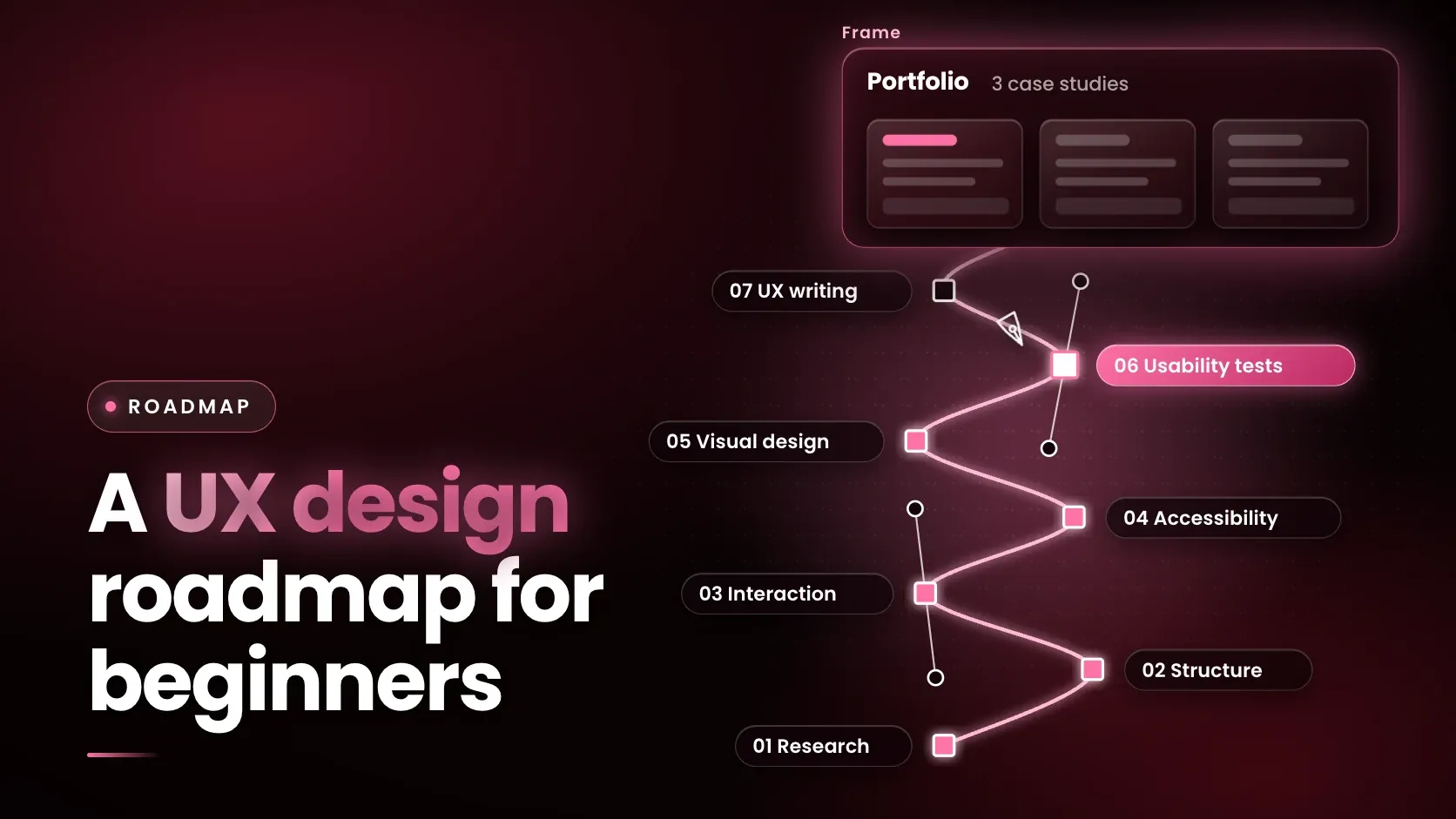
A UX design roadmap for 2027 has eight stages: UX fundamentals, usability heuristics, accessibility, visual basics, Figma, usability testing, writing for UX and a portfolio of case studies. Nielsen Norman Group (NN/G) defines UX design as designing products and services so that they are usable, useful and appropriate for users' needs and context.
Last updated: 11 November 2026.
What is the difference between UX and UI design?
UX design is designing products and services so that they are usable, useful and appropriate for users' needs and context, while UI design is designing the product's user interface. NN/G's UX Disciplines glossary, dated 23 October 2026, says the interface is the set of components such as buttons and links, design elements such as images, icons and headers, and the interactions that make up a product. UI design combines interaction design and visual design.
A product can have a well-designed interface and still offer a poor experience if it lacks the content or functionality users need.
The wider term has a long history: Don Norman and Jakob Nielsen wrote in 1998 that "user experience" encompasses all aspects of the end-user's interaction with the company, its services and its products. NN/G's glossary also defines the neighbouring fields a designer meets:
- Interaction design covers how a product and its users respond to each other: actions, feedback and changes of state.
- Visual design determines how line, shape, colour, grid and space go together in an interface.
- Information architecture decides how content is organised and how it appears in menus.
- UX writing produces clear, concise copy such as labels, buttons, error messages and instructions.
- UX research studies users' behaviours, needs and motivations so that design decisions rest on evidence rather than opinion.
Job titles are not standardised: NN/G's UX-careers survey respondents reported 134 unique job titles, so a posting's duties matter more than its title.
What are the stages of a UX design roadmap?
The roadmap has eight stages, and each has one practice task and a proof that a reviewer can check. The table summarises them.
| Stage | Practice task | Proof before moving on |
|---|---|---|
| 1. UX fundamentals | Write a problem statement and a content map for a small app | A reader can name the users and the task the design supports |
| 2. Usability heuristics | Review an existing app against NN/G's ten heuristics | Every problem found is tied to a named heuristic |
| 3. Accessibility | Check one screen against WCAG 2.2 contrast and target size | A pass or fail for each text and control, with the ratio |
| 4. Visual basics | Rebuild two screens from a small style guide | Type, colour and spacing are consistent across both |
| 5. Figma | Build a clickable prototype in Figma Design | A stranger completes the main task without help |
| 6. Usability testing | Test with five participants, fix and retest | A before and after list of problems |
| 7. Writing for UX | Rewrite the labels, buttons and error messages | Each message says what happened and what to do next |
| 8. Portfolio | Publish case studies of the work above | A hiring manager can scan each one in minutes |
Jakob Nielsen's ten heuristics, published by NN/G in 1994 and last reviewed on 30 January 2024, are broad rules of thumb and not specific guidelines: visibility of system status; match between the system and the real world; user control and freedom; consistency and standards; error prevention; recognition rather than recall; flexibility and efficiency of use; aesthetic and minimalist design; help users recognize, diagnose and recover from errors; and help and documentation. They give stage 2 its checklist.
Figma's help centre lists Figma Design for designing and prototyping in one place, Figma Make for prompting code, Dev Mode for translating designs into code, FigJam as a whiteboard, and newer AI products. The prototype stage uses Figma Design. Comparisons of research and prototyping tools are in best UX research and prototyping tools, and the interview side of research is in product discovery and customer interviews.
What does accessibility require, and how do you test colour contrast?
Accessibility means designing so that people with different abilities can use the product, and the W3C's Web Content Accessibility Guidelines (WCAG) 2.2 are the standard to learn. The W3C Recommendation (version of 12 December 2024) is built on four principles: perceivable, operable, understandable and a fourth principle requiring that content can be interpreted by a wide variety of user agents, including assistive technologies. Thirteen guidelines sit under the principles, and three conformance levels are defined: A (lowest), AA and AAA (highest).
Colour contrast is a criterion that a formula can test. Success Criterion 1.4.3 (Level AA) requires text to have a contrast ratio of at least 4.5:1, or 3:1 for large-scale text. Criterion 1.4.11 asks for at least 3:1 for interface components and graphics needed to understand the content, and Level AAA criterion 1.4.6 asks for 7:1. WCAG defines the ratio as (L1 + 0.05) / (L2 + 0.05), where L1 and L2 are the relative luminance of the lighter and darker colours. This script implements those formulas:
def luminance(hex_colour):
    # relative luminance as defined in WCAG 2.2 for sRGB
    r, g, b = (int(hex_colour.lstrip("#")[i:i + 2], 16) / 255 for i in (0, 2, 4))
    lin = lambda c: c / 12.92 if c <= 0.04045 else ((c + 0.055) / 1.055) ** 2.4
    return 0.2126 * lin(r) + 0.7152 * lin(g) + 0.0722 * lin(b)

def contrast(fg, bg):
    l1, l2 = sorted((luminance(fg), luminance(bg)), reverse=True)
    return (l1 + 0.05) / (l2 + 0.05)

for fg, bg in [("#000000", "#FFFFFF"), ("#767676", "#FFFFFF"), ("#777777", "#FFFFFF"), ("#FFFFFF", "#4C8DF6")]:
    ratio = contrast(fg, bg)
    print(f"{fg} on {bg}: {ratio:.2f}:1  AA text(4.5): {'pass' if ratio >= 4.5 else 'fail'}  AA large(3): {'pass' if ratio >= 3 else 'fail'}")
Run on Python 3.12.13, it printed:
#000000 on #FFFFFF: 21.00:1  AA text(4.5): pass  AA large(3): pass
#767676 on #FFFFFF: 4.54:1  AA text(4.5): pass  AA large(3): pass
#777777 on #FFFFFF: 4.48:1  AA text(4.5): fail  AA large(3): pass
#FFFFFF on #4C8DF6: 3.26:1  AA text(4.5): fail  AA large(3): pass
One digit separates a pass from a fail: grey #767676 on white reaches 4.54:1, and #777777 falls to 4.48:1. White text on the mid-blue passes only as large text. Design tools show ratios, but knowing the formula explains why.
WCAG 2.2 also added criteria, among them 2.5.8 Target Size (Minimum), which sets pointer targets at no smaller than 24 by 24 CSS pixels with several exceptions, plus 2.5.7 Dragging Movements, 3.2.6 Consistent Help and 3.3.7 Redundant Entry. Criterion 4.1.1 Parsing is marked obsolete and removed in 2.2, so older checklists that still include it are out of date.
How do you test a design with users?
Test with a small number of participants, fix what they struggle with, and test again. NN/G's usability article lists five components of usability: learnability, efficiency, memorability, errors and satisfaction.
Jakob Nielsen's article of 18 March 2000 argues that the best results come from testing no more than 5 users and running as many small tests as you can afford, and that the first study of five participants finds 85% of the usability problems, after which the design is fixed and tested again. The same article advises 3 to 4 users from each group when testing two distinct groups of users, and it is about qualitative tests.
Usability testing finds whether people can use a design. It is separate from quality assurance: the US Bureau of Labor Statistics says software quality assurance analysts and testers identify problems with applications or programs and report defects. The QA and software testing roadmap covers that kind of testing.
How do AI tools change UX work?
AI speeds up the desk work of UX, and the work with users still needs people. NN/G surveyed UX practitioners between 24 August and 11 September 2026 and published the results on 23 October 2026, with 521 complete responses.
AI saved time on nearly every task. Among respondents who did each task, about two thirds used AI often or always for writing or editing code (73%), desk research (69%) and analysing their own research data (67%). Use was lowest for work with users: 61% never used AI for interviewing users and 51% never used it for testing designs with users.
Sentiment was mixed. NN/G reports that 65% of respondents expected their roles to remain important or grow, while researchers and designers felt significantly less job-secure than product managers. The survey is a convenience sample drawn from NN/G's panel, newsletter and professional Slack communities, so it describes its respondents and not all designers. The practical reading for a learner is to use AI for drafts, summaries and code, and to keep the judgement tasks (choosing what to build, reading a user's hesitation, deciding what a finding means) as skills of their own.
What should a UX portfolio include?
A UX portfolio should include a few detailed case studies that show the whole process and not just the final screens. NN/G's portfolio article of 4 August 2019, based on a survey of 204 UX professionals in charge of hiring, advises choosing 3 to 5 projects as detailed case studies. A first portfolio can begin with two or three finished studies and grow from there.
Each case study should state the problem, the designer's role, the constraints and timeline, the iterations, and how research informed the design.
The article says hiring managers rarely read a portfolio word for word, so it should be scannable. It also says students should try to get an internship that provides at least one real-world project, and that work under a non-disclosure agreement can be shown through process images, blurred details or recreated designs. Work from this roadmap, with its before and after test findings and its contrast table, gives each case study evidence a reviewer can check.
Do you need to code to be a UX designer?
A UX designer does not need to code, but front-end literacy helps. NN/G's User Experience Careers report, based on a 2019 survey of 693 respondents from 65 countries, found skills in programming software were low for both designers (18%) and researchers (16%), while 63% of designers had HTML and CSS skills against 31% of researchers. The report says the gap may reflect close work with front-end developers at handover. Figma's Dev Mode is built to translate designs into code, and the full stack developer roadmap shows what developers do with a handover.
What are the limits of this roadmap?
A roadmap does not replace a portfolio reviewed by real hiring managers.
The NN/G sources date from 1994 to 2026, and the careers report and the portfolio article are older than the AI survey. WCAG 2.2 is a standard for web content and does not cover every accessibility need. In India, foundit's June 2026 hiring snapshot, published in July 2026, says global capability centres are pulling in product managers, UX designers and domain analysts as they take on end-to-end products, but it gives no vacancy count for UX roles. Pay is not covered here.
Where does this roadmap fit in a product management programme?
Certification in Product Management with Applied AI is an online programme from iHUB DivyaSampark, IIT Roorkee, run with Masai as the implementation partner, with live classes on Zoom and an optional campus immersion, covering product discovery, prototyping with AI app builders, working with engineering teams, product metrics, designing AI features and go-to-market. Its modules include Discovering What to Build and Prototyping with AI App Builders, and its topics include user interviews, user flows and basic design principles, clickable prototypes and user testing, which overlap with stages 1, 5 and 6.
Frequently asked questions
What is the difference between UX and UI design?
UX design is designing products and services so that they are usable, useful and appropriate for users' needs and context. UI design is designing the product's user interface: components, design elements and interactions. NN/G's glossary says a product can have a well-designed UI and still offer a poor experience if it lacks the content or functionality users need.
Do you need to code to be a UX designer?
A UX designer does not need to program software. In NN/G's 2019 careers survey of 693 UX practitioners, 18% of designers had skills in programming software, while 63% had HTML and CSS skills. Front-end literacy helps at handover to developers, but design skills, research and writing are the core of the work.
What should a UX portfolio include?
A UX portfolio should include detailed case studies that show the problem, the designer's role, the constraints, the iterations and how research informed the design. NN/G advises 3 to 5 projects and a scannable layout, because hiring managers rarely read a portfolio word for word. Work under a non-disclosure agreement can be shown through process images.
How many users should you test with in a usability test?
Jakob Nielsen's NN/G article of 18 March 2000 argues for testing with no more than 5 users, fixing the problems and testing again, since the first five participants find 85% of the usability problems. For two distinct groups of users it advises 3 to 4 from each group. The advice applies to qualitative usability tests.
What is WCAG 2.2?
The Web Content Accessibility Guidelines (WCAG) 2.2 are the W3C's recommendation for making web content more accessible to people with disabilities. They rest on four principles, define three conformance levels (A, AA and AAA) and include testable criteria such as a 4.5:1 contrast ratio for normal text at Level AA.
What contrast ratio does WCAG require for text?
WCAG 2.2 Success Criterion 1.4.3, at Level AA, requires a contrast ratio of at least 4.5:1 for text, and 3:1 for large-scale text. Level AAA criterion 1.4.6 asks for 7:1, or 4.5:1 for large text. Non-text components need at least 3:1 under criterion 1.4.11.
Next step
Do the stage 3 contrast check on one screen this week, then build the stage 5 prototype and test it with five people. The Certification in Product Management with Applied AI page lists the discovery, prototyping and user testing modules for readers who want a guided route into product design work, and the common UI design mistakes article is a useful list to review a first screen against.