
Best Google Gemini study hacks for students

Studying in 2026 is no longer about brute-force memorization or drowning in hundreds of disorganized lecture slides. With modern multimodal capabilities, deep Google Workspace integration, and customizable AI personas, Google Gemini functions as a 24/7 personal tutor, research assistant, and exam simulator.
Whether you are preparing for college finals, competitive exams, or high school certifications, learning how to use Google Gemini for studying can cut your revision time in half while improving long-term retention.
Here is your actionable, step-by-step master guide to transforming raw class notes into high-yield study systems.
Why Google Gemini is an essential study tool
Traditional study methods often fail because passive reading creates an illusion of competence. Gemini shifts your workflow from passive consumption to active, Socratic learning.
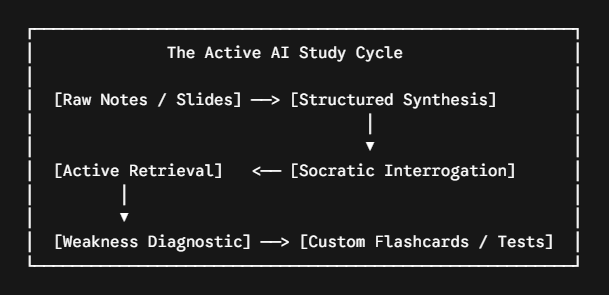
The platform's native multimodal capabilities let you upload photos of handwritten notes, whiteboards, or PDF textbooks, instantly converting unstructured data into interactive study assets.
High-yield prompt matrix for active recall
To get the most out of an LLM, you must move beyond generic prompts like "summarize this chapter." Precise constraints, assigned personas, and explicit output formats yield far superior results.
Custom Gems and Canvas for dedicated subject tutoring
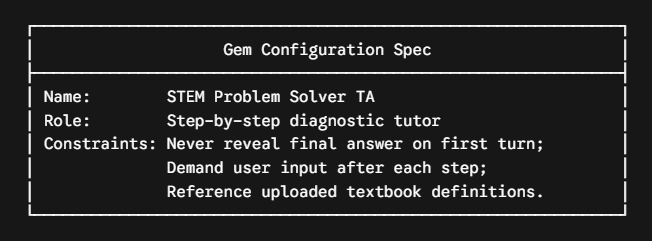
One of the most effective ways to study with AI is configuring dedicated Gemini Gems for specific academic subjects. Instead of re-entering rules in every conversation, a custom Gem locks in your course level, syllabus boundaries, and learning preferences permanently.
Step-by-step Gem setup for exam preparation
- Open Gemini Gems: Navigate to the Gem manager in the Gemini dashboard.
- Define the persona: Instruct the Gem to behave as a specialized teaching assistant (e.g., Organic Chemistry TA or AP Microeconomics Mentor).
- Set strict guardrails: Add rules such as "Always require me to attempt the problem first" and "Cite standard academic formulas before solving."
- Upload course material: Attach your syllabus, lecture outlines, or formula sheets directly to the Gem's context window.
When writing essays or solving multi-step coding assignments, switch to Gemini Canvas. Canvas provides a side-by-side workspace where you draft your arguments on the left while using Gemini on the right to refine transitions, check logic flow, and verify technical syntax.
Integrating Google Workspace and Connected apps
Gemini’s direct integration with Google Drive, Docs, and Gmail eliminates the friction of switching between apps during heavy study sessions. Research published by Lifehacker highlights that tapping into Connected Apps streamlines research workflows by grounding AI responses directly in your private documents.
Turning lecture slides and diagrams into study guides
Students often waste hours transcribing slide decks into written notes. You can automate this process using multimodal vision:
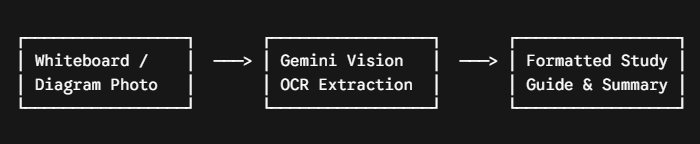
- Capture raw media: Take clear photos of lecture whiteboards, flowcharts, or complex textbook diagrams.
- Upload with extraction prompts:"Extract all text, mathematical formulas (in LaTeX), and bullet points from this image. Then, structure the content into an executive summary followed by a 3-bullet key takeaway list."
- Generate audio overviews: For auditory learners, feeding your generated summary into NotebookLM or Gemini Audio Overviews converts static notes into an interactive, podcast-style discussion between two AI hosts.
Essential strategies for accuracy and academic integrity
While generative AI accelerates research, fact-checking remains essential. LLMs can occasionally generate hallucinations or misinterpret nuanced edge cases. For assignments that have to stand up to a marker, it is worth starting from an AI research assistant that searches published papers directly, so every claim in your draft is tied to a study you can open and check.
- Demand verified source citations: Append this rule to research prompts: "Cite primary academic literature, peer-reviewed journals, or standard textbook definitions for every claim."
- Use double-check verification: Use Gemini's built-in Google Search grounding button to evaluate whether web results corroborate the generated output.
- Keep temporary chats for exploratory queries: Use temporary chats when doing rapid, one-off brainstorms that you don't need cluttering your contextual history.
- Prioritize problem-solving over direct answers: Use AI to understand underlying principles rather than copying homework solutions. True mastery comes from being able to solve the problem when the screen is turned off.
Frequently asked questions
Does using Google Gemini violate academic integrity policies?
Using Gemini for tutoring, active recall, brainstorming, and concept clarification complies with standard academic integrity guidelines. However, submitting AI-generated prose or code as your own original coursework constitutes academic misconduct. Always verify your institution's specific AI honor codes before submitting assignments.
How does Google Gemini compare to ChatGPT for studying?
While both platforms provide natural language tutoring, Google Gemini holds a distinct advantage for students embedded in the Google ecosystem due to native Workspace integration (Drive, Docs, Gmail) and YouTube video timestamp indexing.
- Gemini strengths: Direct connection to Google Drive files, live web-grounded search citations, and seamless export to Google Docs and Sheets.
- ChatGPT strengths: Advanced custom GPT ecosystem and third-party plugin workflows.
Can Google Gemini transcribe and summarize handwritten notes?
Yes. Google Gemini uses multimodal optical character recognition (OCR) to accurately extract text, bullet points, and mathematical equations directly from photos of handwritten notes, lined paper, and classroom whiteboards.
Also Read
Kimi AI Review 2026: Features, Pricing & Comparison
ChatGPT Is Just the Beginning: AI Skills You Need Beyond Prompting in 2026
Best Google AI Tools in 2026 for Students: Gemini, Veo, NotebookLM & More Explained